Google Discover Architecture: Clusters, Classifiers, OG Tags, NAIADES - What SDK Telemetry Reveals
-min.png)
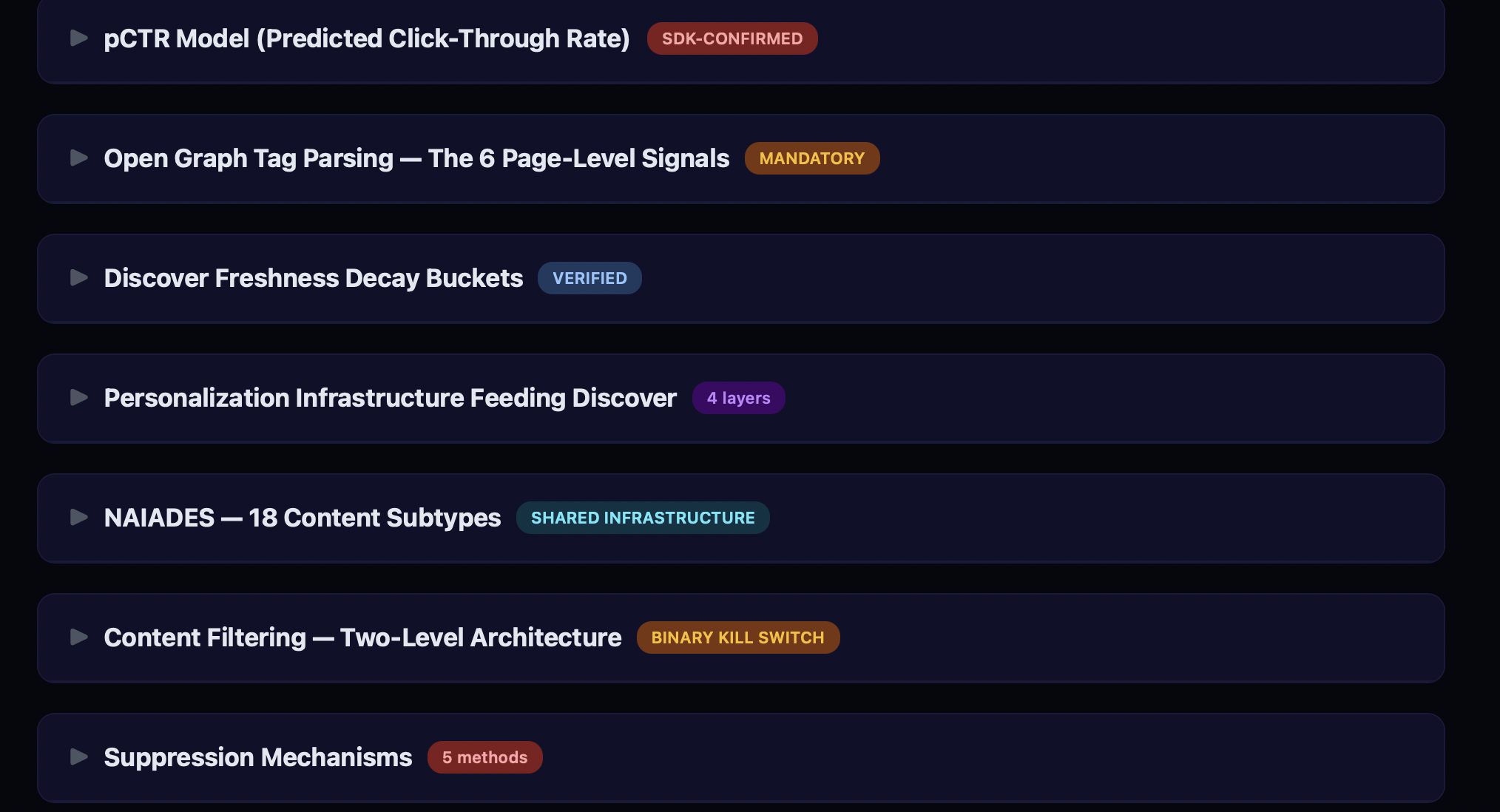
Google Discover serves content to hundreds of millions of users every day, yet its internal mechanics remain largely opaque. Most SEO guidance about Discover comes from Google’s own documentation or anecdotal publisher observations. In this post, I want to share a different perspective: what we can learn by examining the observable telemetry, event naming conventions, and client-side state of the Google App.
-UPDATED-
Important note: Everything described below reflects what the client-side code reveals at a specific point in time. This is Google. They can change any of these systems, ranking signals, pipeline stages, telemetry counters, feature flags, on the server side at any moment, without any client update. What you read here is a snapshot, not a permanent blueprint. Treat it as a lens into how these systems work today, not a guarantee of how they will work tomorrow.
Where something is an inference rather than a direct observation, I say so. I needed to handle a “great amount of data” and removed many parts.
Think of this as reading the nutrition label on a packaged food. You cannot see the factory, but the label tells you quite a lot about what is inside.
Special thanks to Valentin Pletzer
The Content Pipeline
Discover’s content pipeline can be mapped to several observable stages, each leaving distinct telemetry traces:
- Content Ingestion: Google crawls and indexes content. Entity extraction assigns Knowledge Graph MIDs (
/m/xxxxx) or (/g/xxxxx) to recognized topics. - Structured Data & Open Graph Parsing: The client-side parser extracts page metadata with a defined priority order: Schema.org JSON-LD is checked first, followed by Open Graph tags, then Twitter Card tags, then generic HTML meta tags. This is a hardcoded fallback chain, not a preference. If JSON-LD has the field, OG tags for that field are never reached.
- Content Classification: Content is assigned to cluster types and classified for the feed hierarchy.
- Content Filtering — The system operates two separate filter levels:
filter_collection_status(publisher/domain level) andfilter_entity_status(single URL level). These are tracked as Discover-specific streamz metrics at/client_streamz/android_gsa/discover/app_content/. - User Interest Matching: Content entity MIDs are matched against the user’s interest profile through the NAIADES personalization system (verified subtypes below).
- Ranking (Server-Side): Ranking happens server-side. The client-side code reveals what data is packaged and sent to the server, but the actual ranking models are not observable from the client.
- Feed Assembly: Content is organized and delivered to the device via gRPC streaming, background WorkManager sync, beacon push, or cache.
- Feedback Loop: User interactions (dismissals, follows, saves) feed back into personalization. Dismissed content is permanently tombstoned.
What is notable here is the ordering. The collection-level filter runs before interest matching and ranking. This means a publisher blocked at the collection level never even reaches the ranking stage, regardless of how relevant their content might be to a user.
Structured Data & Open Graph: What the Code Actually Parses
Publishers often wonder which meta tags Discover actually uses. The decompiled parser class (dkpg.java, self-described as SchemaOrg{parsedMetatags, jsonLdScripts}) reveals the exact tags and their priority order.
The critical finding: Schema.org JSON-LD structured data is checked first for title, author, and publisher — not Open Graph tags. OG tags are the fallback. This is hardcoded in the fallback chain logic.
Verified Fallback Chains (from java files)
Title:
- Schema.org structured data (
TEXT_TYPE_TITLE) og:title(viapropertyattribute)twitter:title(vianameattribute)title(genericnameattribute)
Author:
- Schema.org structured data (
TEXT_TYPE_AUTHOR) author(vianameattribute)
Publisher:
- Schema.org structured data (
TEXT_TYPE_PUBLISHER) og:site_name(viapropertyattribute)
Image:
og:image(viapropertyattribute)twitter:image(vianameattribute)og:image:secure_url(viapropertyattribute)twitter:image:src(vianameattribute)image(genericnameattribute)
Language:
- Primary language detection (execution-based)
og:locale(viapropertyattribute)inLanguage(Schema.org JSON-LD)- Hardcoded fallback to
"en"(conditional on server config flag)
Paywall Classification (from dkri.java:173-176, dkqd.java)
The system checks paywall status in this exact order:
-
First:
isAccessibleForFree(Schema.org JSON-LD boolean) — defaults totrueif absent -
Then:
article:content_tierrecognized values are exactly three strings:"free"the expected default"metered"counted as paywalled"locked"counted as paywalled
If multiple article:content_tier values are found on the same page, the code logs a warning: "More than one content tier found" (event code 38468). Use only one value.
Blocking Meta Tags (from dkri.java:304-416)
Two meta tags halt the pipeline entirely with an exception (dkma):
nopagereadaloudtriggersDISALLOWED_FOR_READOUTnotranslatetriggersDISALLOWED_FOR_TRANSLATION
When either is detected as a meta tag, the system throws an error and stops processing that page. If your CMS or translation plugin injects notranslate as a meta tag, your content may not enter this parsing pipeline.
JSON/OG Rewrite in Action
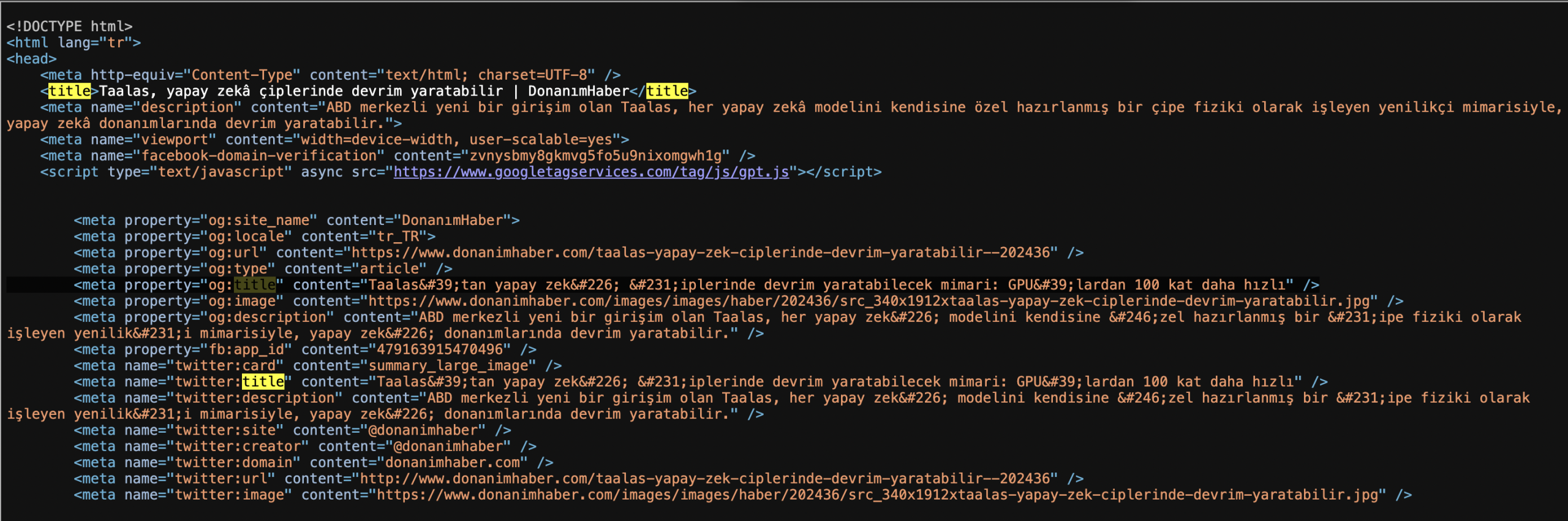
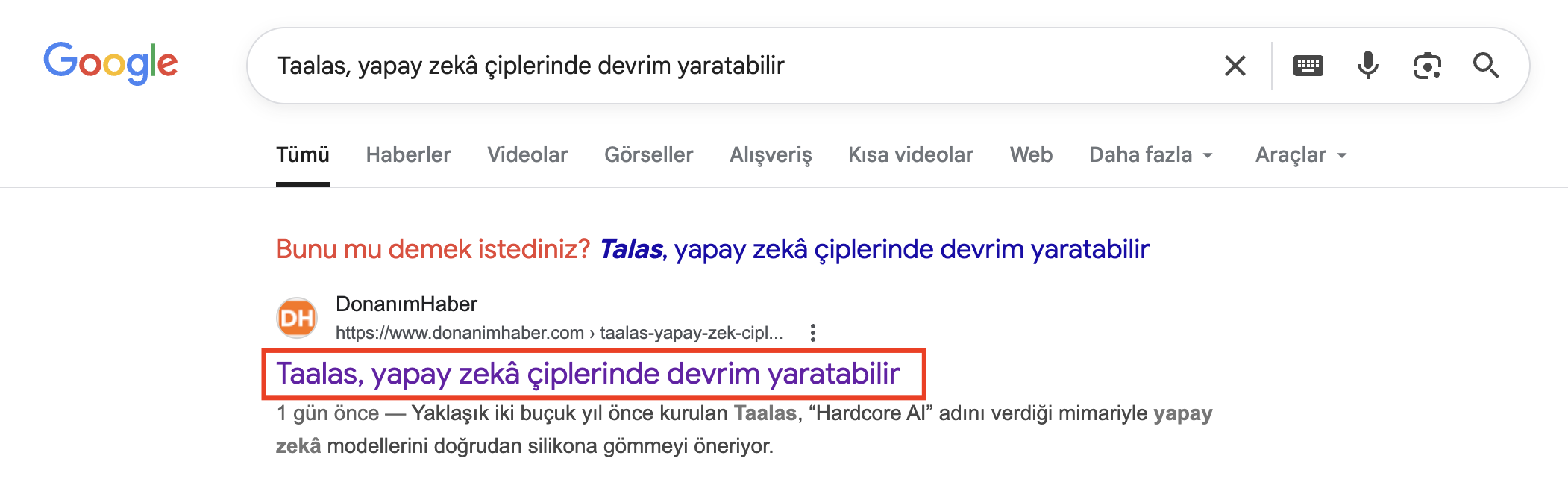
Now let’s see in Discover below.
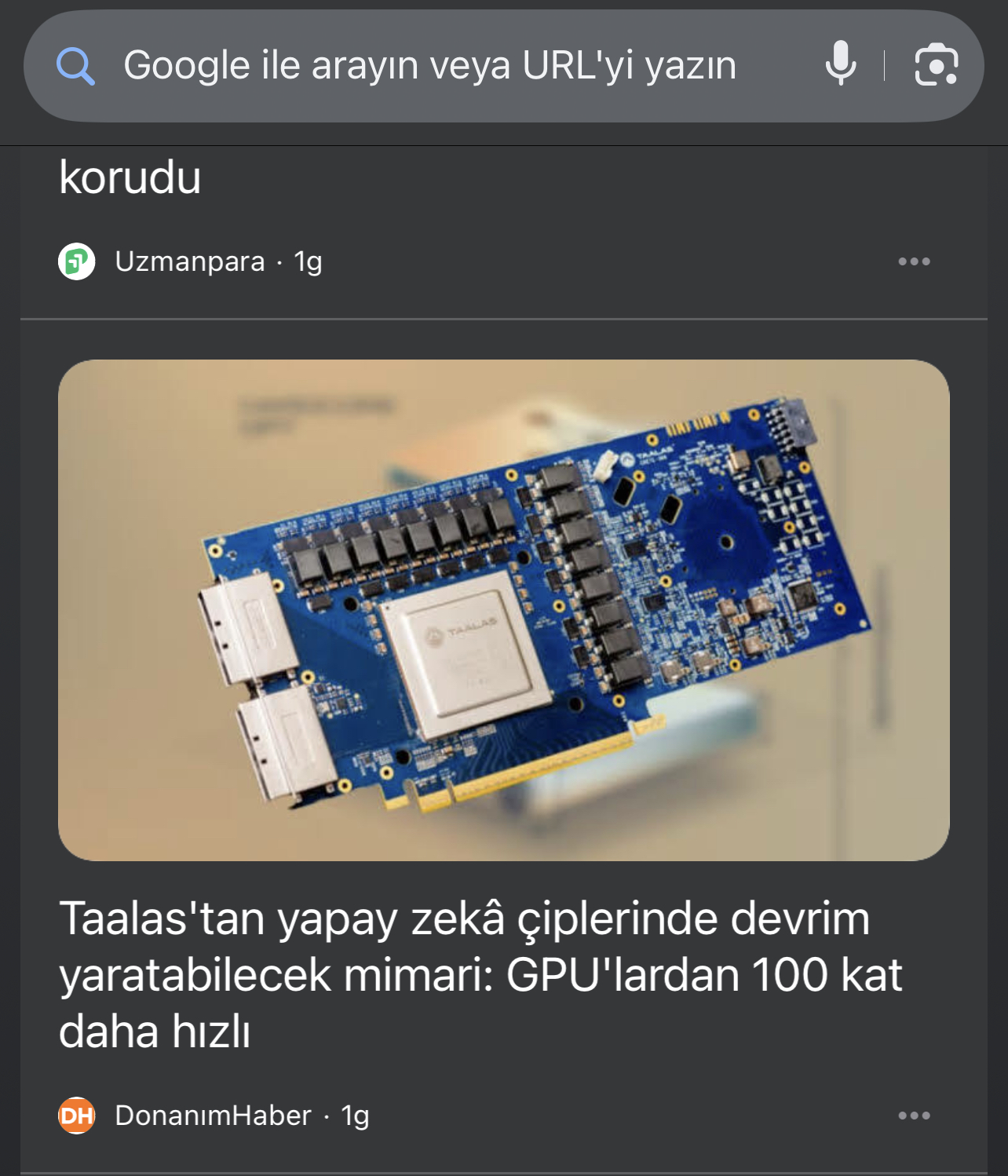
And this is the og:image link: https://www.donanimhaber.com/images/images/haber/202436/src_340x1912xtaalas-yapay-zek-ciplerinde-devrim-yaratabilir.jpg

This JPG link placed in only og:image & twitter:image tags, not in the schema.org (Is it proven? No, the other image is 1400x788px wide in schema tag, it’s Google, you can decide it.)

Content Filtering: The Two-Level Architecture
Discover’s content filtering operates multiple levels, each tracked by its own Discover-specific streamz metric, identified ones are below:
- Collection level (
/client_streamz/android_gsa/discover/app_content/filter_collection_status) — blocks content from a publisher/domain. Parameterized byreason. - Entity level (
/client_streamz/android_gsa/discover/app_content/filter_entity_status) — blocks a single URL. Parameterized byreason.
When a user selects “Don’t show content from [Publisher]” in the card menu, this triggers the collection-level filter. A single article that generates enough negative feedback can suppress an entire publication. That reaction applies to all content from that domain, not just the triggering article. Supressing algorithm can extend the publisher-level filtering.
Important caveat: These are client-side telemetry counters. They confirm the filter mechanisms exist and are tracked, but the exact server-side thresholds, recovery mechanisms, and how “reason” values map to user actions are not observable from the client. Google can change these configurations at any time without a client update.
Tombstoning (from bska.java)
Dismissed content is permanently recorded with a tombstoned boolean field on the content state object. The content state also tracks stallState, lastKnownState (INSERTED/REMOVED/UNKNOWN), and purged — creating a complete lifecycle record. Tombstoned content does not resurface.
The NAIADES Personalization System (from fiqc.java)
The code reveals a personalization system called NAIADES with multiple content subtypes, all confirmed as enum values:
| Subtype | Enum Value | What It Suggests |
|---|---|---|
SUBTYPE_PERSONAL_UPDATE_MID_BASED_NAIADES | 793 | Entity/Knowledge Graph-based personalization |
SUBTYPE_PERSONAL_UPDATE_QUERY_BASED_NAIADES | 792 | Search query-based personalization |
SUBTYPE_PERSONAL_UPDATE_QUERY_BASED_NAIADES_PERSISTENT_LOGGING | 805 | Same with persistent logging |
SUBTYPE_PERSONAL_UPDATE_RECALL_BOOST | 797 | Increases retrieval priority from the candidate pool |
SUBTYPE_PERSONAL_UPDATE_WPAS | 800 | Web Publisher Articles Signal |
SUBTYPE_PERSONAL_UPDATE_WPAS_PERSISTENT_LOGGING | 811 | Same with persistent logging |
SUBTYPE_PERSONAL_UPDATE_AIM_THREAD_NAIADES | 856 | AIM (AI Mode) thread-based |
WPAS (Web Publisher Articles Signal) likely corresponds to Google News Publisher Center registration, meaning content from registered publishers gets a distinct classification in the personalization pipeline. RECALL_BOOST can suggest increased retrieval priority from the candidate pool, boosting content during retrieval, before ranking. (We can’t see server-side configuration, attention please)
Caveat: These are enum names in a content subtype classification system. They confirm the categories exist, but how much weight each subtype carries in ranking is a server-side decision we cannot observe.
Suppression and Counterfactual Experiments
Discover runs counterfactual experiments. The code confirms:
SHOW_SKIPPED_DUE_TO_COUNTERFACTUAL(fromfevu.java, enum value 16) — content withheld for A/B testingVISIBILITY_REPRESSED_COUNTERFACTUAL(fromeyxv.java) — a Visual Element logging state used across the Google App (not Discover-specific) that marks elements deliberately suppressed for experiment measurementbackground_refresh_rug_pull_count(frombupa.java, under/client_streamz/android_gsa/discover/) a Discover-specific counter tracking cases where content was pushed to the feed and then removed during a background refresh. 100% verified
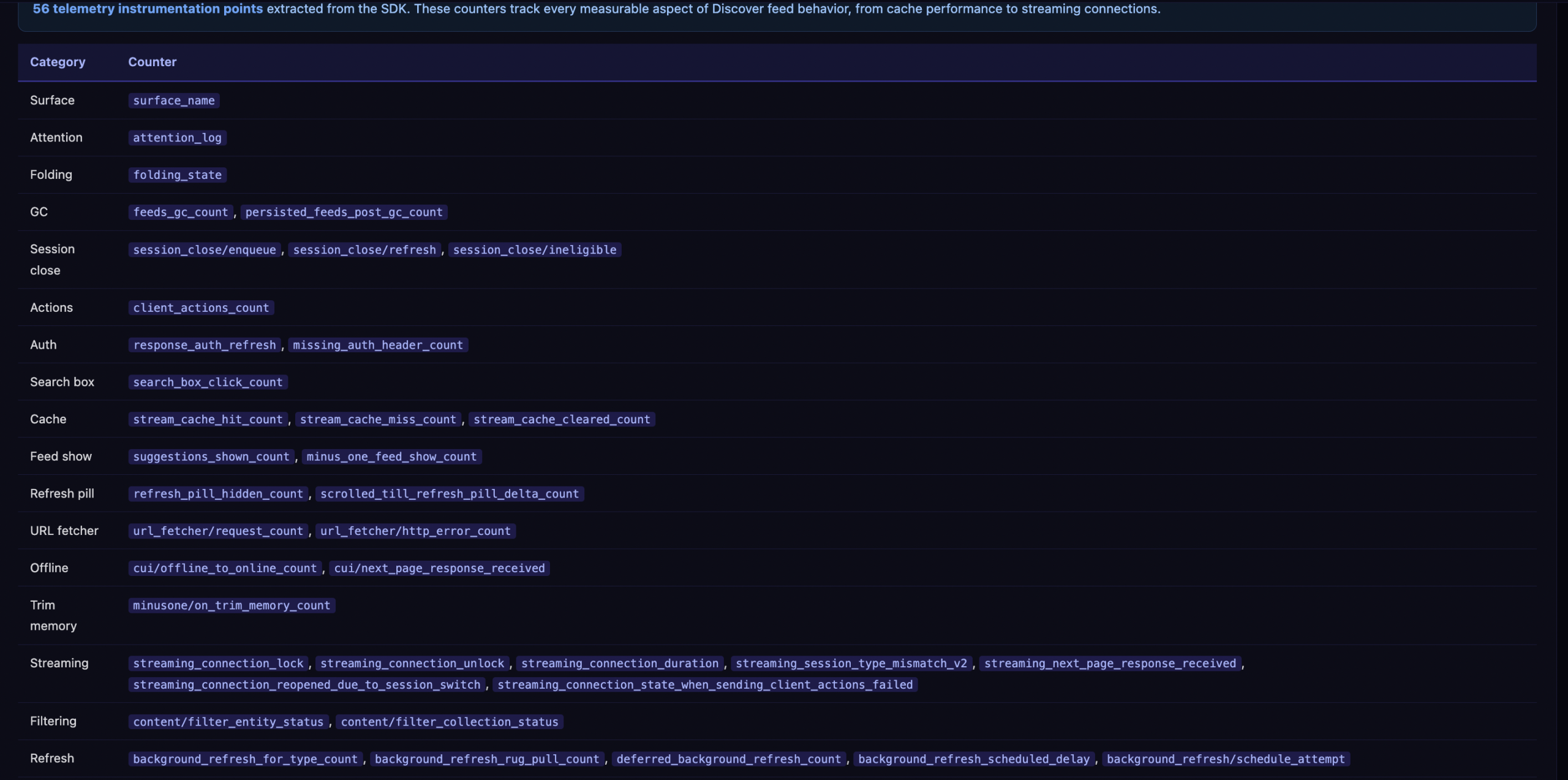
The “rug pull” counter is particularly notable. It tracks cases where content was delivered to the feed and then retroactively removed. This means Discover can withdraw content that was already in the feed, not just filter it before display.
The Beacon Push System
Most Discover content arrives through pull-based feed requests, but there is also a push channel. The Beacon system allows Google’s servers to proactively push content to a user’s device.
From the decompiled code (bqmt.java), Beacon currently handles exactly two content types:
- Sports scores (
SportsScoreAmbientDataDocument) ordinal 0 - Investment/finance recaps (
InvestmentRecapAmbientDataDocument) ordinal 1 - Anything else triggers
"Unsupported BeaconContent type: %s"and is rejected
Beacon has its own metrics (from bupa.java):
/client_streamz/android_gsa/discover/beacon/incoming_sports_notifications_count
/client_streamz/android_gsa/discover/beacon/donated_sports_documents_count
/client_streamz/android_gsa/discover/beacon/dropped_sports_notifications_count
/client_streamz/android_gsa/discover/beacon/appsearch_cleared_count
Sports content has 10+ dedicated notification types (from fkld.java): SPORTS_AWARENESS_NOTIF, SPORTS_GAME_CRICKET_MILESTONE_NOTIF, SPORTS_BREAKING_NEWS_NOTIF, SPORTS_LIVE_ACTIVITY_NOTIF, SPORTS_PREGAME_ANALYSIS_AIM_NOTIF, SPORTS_LEAGUE_INSIGHTS_AIM_NOTIF, SPORTS_STANDINGS_NOTIF, and more. General breaking news has just one: BREAKING_NEWS_NOTIF. The structural investment in sports notification infrastructure is significantly larger. It may share very similar infrastructure with Google News // This part seems dynamic, so it can change anytime.
Freshness Buckets
The code contains time-based bucketing logic (from bemp.java:215):
days < 1  → "0_DAYS"
days < 8  → "1_TO_7_DAYS"
days < 15 → "8_TO_14_DAYS"
days < 31 → "15_TO_30_DAYS"
days < 61 → "31_TO_60_DAYS"
days >= 61 → "TAIL"
Important correction: In the decompiled code, this bucketing logic appears in a gesture settings context (GestureSettingsPreferenceFragment), not in a Discover-specific class. The bucket names and time ranges are confirmed as exact strings, but their direct connection to Discover’s content freshness scoring cannot be verified from the client side alone. The bucketing pattern is consistent with how Google typically handles content age, but I cannot prove these specific buckets are used for Discover feed ranking.
13 Cluster Types
Every card in the Discover feed belongs to a cluster. The following cluster type names are observable:
neonclusterthe primary content clustergeotargetingstorieslocation-based storiesdeeptrendsanddeeptrendsfabletrending topic narrativesfreshvideosrecent video contentmustntmisspriority/must-read contentnewsstoriesheadlinesbreaking newshomestackwidget cards (weather, sports scores)garamondrelatedarticlegroupingrelated article groupstrendingugcuser-generated trending contentsigninluresign-in promptsiospromocross-platform promotionmoonstonean internal-codename cluster
mustntmiss suggests there is a priority queue of content the system considers essential to show. garamondrelatedarticlegrouping hints that the system can create related-article groupings — combining separate articles under a shared topic heading.
Real-Time Feed Delivery
Discover does not simply fetch a static list of cards. The code reveals a persistent gRPC connection architecture with distinct service endpoints (verified from ehdf.java):
google.internal.discover.discofeed.feedrenderer.v1.DiscoverFeedRendererstandard feed withQueryInteractiveFeedandQueryNextPagegoogle.internal.discover.discofeed.streamingfeedrenderer.v1.DiscoverStreamingFeedRendererstreaming variant withQueryStreamingFeedgoogle.internal.discover.discofeed.actions.v1.DiscoverActionsUploadActionsandBackgroundUploadActionsgoogle.internal.discover.discofeed.reactions.v1.DiscoverReactionsListReactionsgoogle.internal.discover.discofeed.recommendations.v1.StoryRecommendationsgoogle.internal.discover.discofeed.homestack.v1.DiscoverHomestackFeedRenderer
What this means for publishers: your content does not wait for the user to pull-to-refresh. The streaming feed renderer keeps a live connection. The server can inject new cards, reorder existing ones, or remove stale content mid-session. The feed is a living stream, not a snapshot.
What This Means for Publishers
Let me be clear about what this analysis is and is not. It is a set of observations about how the Google App’s client-side systems are instrumented. It is not a reverse-engineering of server-side ranking algorithms, which remain on Google’s servers and are not directly observable.
That said, some practical observations emerge:
- Schema.org JSON-LD takes priority over OG tags. The parser checks structured data first for title, author, and publisher. OG tags are the fallback. If you only implement og:tags without JSON-LD markup, you’re relying on the second-choice path.
- Images are essential. The image fallback chain is five levels deep — the system tries hard to find an image. Use images at least 1200px wide for hero card eligibility.
og:titleis packaged and sent to Google’s servers as part of the ContentMetadata payload. Whether it’s a direct ranking input is plausible but unconfirmed from client-side observation alone. Either way, it is part of the data that informs server-side decisions.- Collection-level blocking is tracked as a distinct metric. The
filter_collection_statuscounter confirms this mechanism exists at the publisher/domain level. However, we can only observe the telemetry counter, not the server-side thresholds or recovery mechanisms. Google can change these at any time. - Publisher Center registration creates a distinct signal. The
WPAS(Web Publisher Articles Signal) subtype means registered publishers get different classification treatment in the NAIADES personalization system. article:content_tiermatters. The parser explicitly recognizesfree,metered, andlocked. Use one value only — multiple values trigger a warning.notranslateandnopagereadaloudmeta tags can halt the parsing pipeline. If your CMS injects these, you need to run experiments and filter Discover traffic.- User dismissals are permanent. Content is tombstoned and does not resurface.
- Sports publishers have a structural advantage in the push notification pipeline. 10+ dedicated notification types vs 1 for general breaking news. Client-side confirms, we can’t see server-side configuration.
MY Corrections & Caveats
During fact-checking, several items required correction:
| Original Claim | Correction |
|---|---|
| ”Exactly 6 OG tags are parsed” | The parser handles 6 OG tags but also parses twitter:image, twitter:title, twitter:image:src, author, title, inLanguage, isAccessibleForFree, image (generic), and Schema.org JSON-LD. Total parsed tags is significantly more than 6 |
EVERGREEN_VIBRANT is a content classification type | It is a UI color palette name in XgadsContext for theming, alongside CANDY_VIBRANT, GLACIER_VIBRANT, LEMON_VIBRANT etc. Not a content type |
engagement_time_msec is a Discover-specific engagement signal | It is a standard Firebase Analytics (GA4) parameter (_et on the wire), used by every app with Firebase Analytics. It measures app-level engagement, not article-level engagement |
freshness_delta_in_seconds / staleness_in_hours are Discover content metrics | In the decompiled code, these appear in Smartspace weather/air quality metrics, not in Discover-specific classes |
| Freshness buckets (1_TO_7_DAYS etc.) are Discover-specific | The bucket strings exist but appear in a gesture settings context, not a confirmed Discover class |
VISIBILITY_REPRESSED_COUNTERFACTUAL is Discover-specific | It is a Google-wide Visual Element logging state shared across the entire Google App (Assistant, Lens, Search, etc.) |
isCollectionHiddenFromEmberFeed is about Discover feed filtering | It is about the Ember tab (a separate visual image discovery tab in the Google App), not the Discover feed |
PCTR_MODEL_TRIGGERED confirms a Discover pCTR model | Not found in this SDK version. This doesn’t mean it doesn’t exist. It may be in server-side config or a different SDK version |
| OG tags are the primary parsing target | Schema.org JSON-LD structured data is checked first for title, author, and publisher. OG tags are the fallback. The OG tags have been in action for a long time. |
Methodology Note
All findings in this analysis are derived from decompiling Google App 87,498 classes across 13 DEX files. Of these, 95.5% were obfuscated under package p000/ with no ProGuard mapping file available.
Deobfuscation was performed through string literal analysis, class hierarchy tracing, gRPC endpoint extraction, and Hilt dependency injection graph reconstruction. Where findings are confirmed via exact string matches in decompiled source, they are labeled as verified. Where findings are inferences based on naming conventions or code proximity, that is noted.
No server-side systems were accessed. Server-side ranking models, experiment allocations, and pipeline stages can all change independently of the client. What we can observe is the instrumentation; the questions the system asks and the answers it records, which reveal the architecture even as the parameters shift underneath.
Get new research on AI search, SEO experiments, and LLM visibility delivered to your inbox.
Powered by Substack · No spam · Unsubscribe anytime